 Haitao Pan
d3356a0ef0
Haitao Pan
d3356a0ef0
Documents the YAML->generate.py->terraform->cmdb.json->ansible flow, the FQDN inventory_hostname contract, the two execution models, the Vault-OIDC pipeline, the non-empty/fail-fast checks, and the key fixes that make it work end to end. Co-Authored-By: Claude Opus 4.8 <noreply@anthropic.com> |
||
|---|---|---|
| .github/workflows | ||
| api | ||
| assets/readme | ||
| config | ||
| dashboard | ||
| docs | ||
| scripts | ||
| tests | ||
| .gitignore | ||
| LICENSE | ||
| README.md | ||
| README.zh.md | ||
XWorkspace Console
XWorkspace Console is the local AI workspace control plane for AI Workspace Lab. It brings together a React dashboard, Go status API, systemd user services, and XFCE desktop templates into one tabbed surface for services, runtime, terminal access, and workspace navigation.
Preview
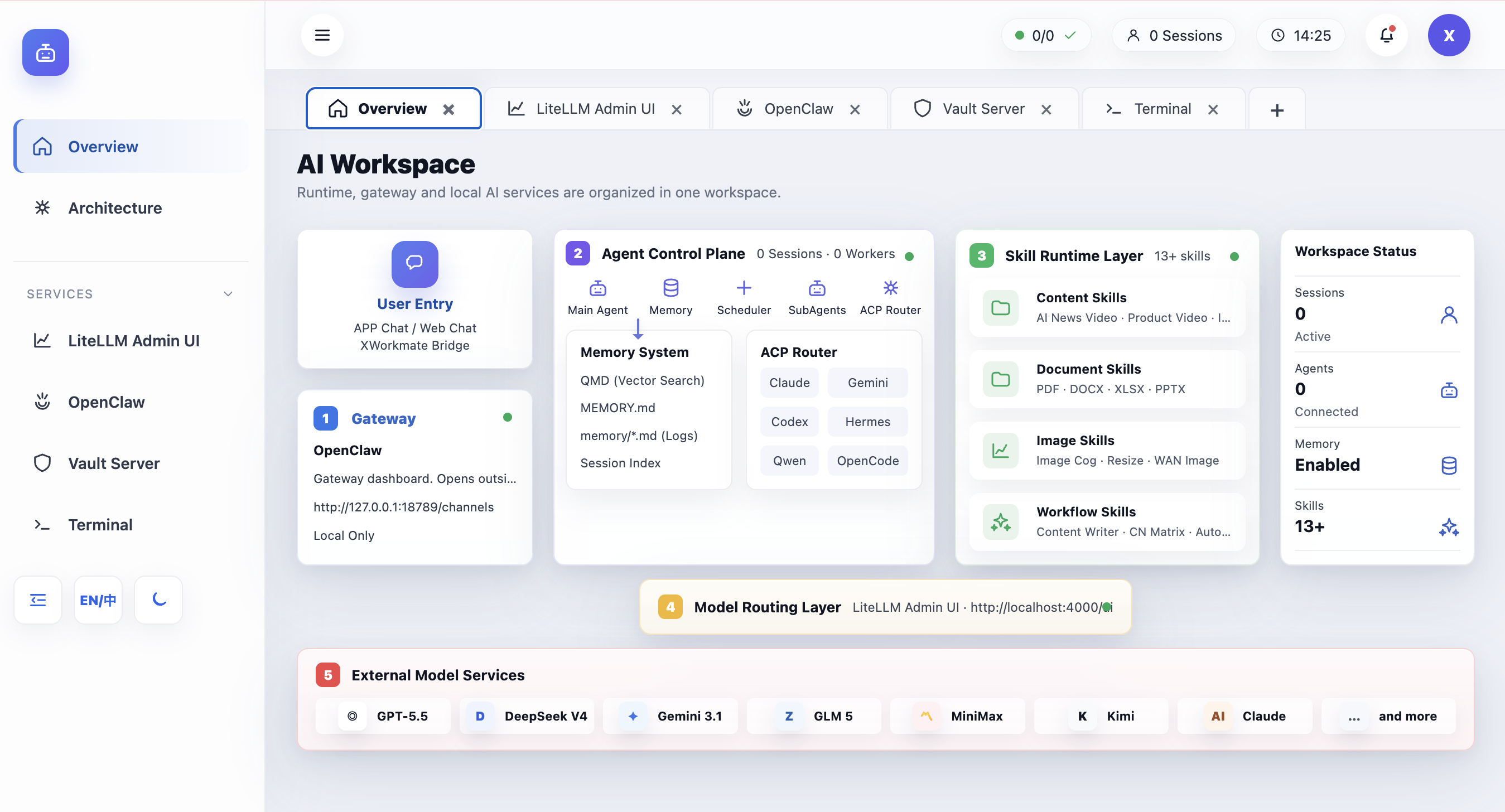
About
- Single entry point for the workspace UI at
http://127.0.0.1:17000 - Tab-first console for Workspace, services, runtime, and embedded tools
- Designed to coordinate local AI services, gateway access, and desktop bootstrap flows
- Backed by
dashboard/,api/,config/,scripts/, anddocs/
Start TLDR
Note: Currently supports macOS, Debian, and Ubuntu. Other systems are untested.
Installation
- Start the all-in-one installer:
curl -sfL https://raw.githubusercontent.com/ai-workspace-lab/xworkspace-console/main/scripts/setup-ai-workspace-all-in-one.sh | bash -
- Automatic model registration (via API Keys):
Exporting keys before running the installer automatically registers models (e.g., DeepSeek、NVIDIA NIM、Ollama Cloud) in the gateway:
export DEEPSEEK_API_KEY="sk-..."
export NVIDIA_API_KEY="nvapi-..."
export OLLAMA_API_KEY="your-key-here"

curl -sfL https://raw.githubusercontent.com/ai-workspace-lab/xworkspace-console/main/scripts/setup-ai-workspace-all-in-one.sh | bash -
- Offline installation:
Use a pre-downloaded deployment package by specifying its file path:
export AI_WORKSPACE_OFFLINE_PACKAGE="/path/to/offline-package.tar.gz"
curl -sfL https://raw.githubusercontent.com/ai-workspace-lab/xworkspace-console/main/scripts/setup-ai-workspace-all-in-one.sh | bash -
Uninstallation
# Standard uninstall (keeps configurations and states)
curl -sfL https://raw.githubusercontent.com/ai-workspace-lab/xworkspace-console/main/scripts/setup-ai-workspace-all-in-one.sh | bash -s -- uninstall

# Purge (removes all data, keys, and configurations)
curl -sfL https://raw.githubusercontent.com/ai-workspace-lab/xworkspace-console/main/scripts/setup-ai-workspace-all-in-one.sh | bash -s -- uninstall --purge
Usage
- Open the console via your browser:
http://127.0.0.1:17000
- Or launch the local desktop console application:
./scripts/setup-xworkspace-desktop.sh
Download
- Latest source: GitHub repository
- Releases: GitHub Releases
- Bootstrap script:
scripts/setup-ai-workspace-all-in-one.sh - Offline installer docs:
docs/en/OFFLINE_AI_WORKSPACE_INSTALLER.md